

What are the Big Objects?
Big objects allow you to store and manage a massive amount (billions of rows) of data on the Salesforce platform. It provides a consistent performance with massive data for searching and returning results quickly.
Big objects are accessible with a standard set of APIs to your org or external system.
Types of Big Objects:
- Standard big objects are defined by Salesforce and are included in Salesforce products. For example, FieldHistoryArchive stores the history of field changes on your Salesforce objects
- Custom big objects are defined and deployed by you through the Metadata API.
Custom Big Objects
Considerations:
- You must use the Metadata API to define a big object or add a field to a custom big object.
- Big objects support custom Lightning and Visualforce components rather than standard UI elements.
- You can create up to 100 big objects per org.
- Features like triggers, flows, processes, and the Salesforce app are not available.
- You can't use Salesforce Connect external objects to access big objects in another org.
How to Create a Big Object:
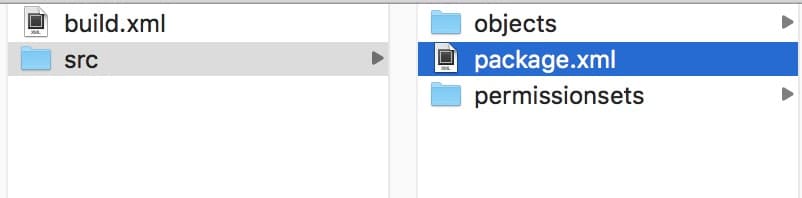
Salesforce doesn't provide the ability to define a custom big object from the Salesforce UI. The only way we have to build it is through the Metadata API. To create a big object, you need three files:
- An object file: This file is required to create a big object. In this file, we define the custom big object's fields and indexes.
- A permission set or profile file: This file is not required, but we use this file to define user access for a custom big object. Here we define field permissions for a custom big object.
- A package.xml file: This file is also required. This is the same file that we use for salesforce component deployment and retrieval. Here we describe our custom object.
Sample big object file (Rider_History__b.object):
<?xml version="1.0" encoding="UTF-8"?>
<CustomObject xmlns="http://soap.sforce.com/2006/04/metadata">
   <deploymentStatus>Deployed</deploymentStatus>
       <fields>
          <fullName>Start\_Location\_Lat\_\_c</fullName>
          <label>Start Location Latitude</label>
          <required>false</required>
          <type>Number</type>
          <scale>4</scale>
          <precision>7</precision>
          <unique>false</unique>
       </fields>
       <fields>
          <fullName>Start\_Location\_Long\_\_c</fullName>
          <label>Start Location Longitude</label>
          <required>false</required>
          <type>Number</type>
          <scale>4</scale>
          <precision>7</precision>
          <unique>false</unique>
      </fields>
      <fields>
          <fullName>Start\_Time\_\_c</fullName>
          <label>Start Time</label>
          <required>true</required>
          <type>DateTime</type>
          <unique>false</unique>
      </fields>
      <fields>
         <fullName>End\_Time\_\_c</fullName>
         <label>End Time</label>
         <required>false</required>
         <type>DateTime</type>
         <unique>false</unique>
      </fields>
      <fields>
         <fullName>Service\_Type\_\_c</fullName>
         <label>Service Type</label>
         <length>16</length>
         <required>false</required>
         <type>Text</type>
         <unique>false</unique>
      </fields>
      <fields>
         <fullName>Rider\_Account\_\_c</fullName>
         <label>Rider Account</label>
         <length>16</length>
         <required>true</required>
         <type>Text</type>
         <unique>false</unique>
      </fields>
      <fields>
         <fullName>Rider\_Rating\_\_c</fullName>
         <label>Rider Rating</label>
         <required>false</required>
         <type>Number</type>
         <scale>1</scale>
         <precision>2</precision>
         <unique>false</unique>
      </fields>
      <indexes>
         <fullName>Rider\_History\_Index</fullName>
         <label>Rider History Index</label>
      <fields>
         <name>Rider\_Account\_\_c</name>
         <sortDirection>DESC</sortDirection>
      </fields>
      <fields>
         <name>Start\_Time\_\_c</name>
         <sortDirection>DESC</sortDirection>
      </fields>
 </indexes>
     <label>Rider History</label>
     <pluralLabel>Rider Histories</pluralLabel>
</CustomObject>

Sample permission set file (rider_history.permissionset)
<?xml version="1.0" encoding="UTF-8"?>
   <PermissionSet xmlns="http://soap.sforce.com/2006/04/metadata">
      <fieldPermissions>
         <editable>true</editable>
         <field>rider\_history\_\_b.Start\_Location\_Lat\_\_c</field>
         <readable>true</readable>
      </fieldPermissions>
      <fieldPermissions>
         <editable>true</editable>
         <field>rider\_history\_\_b.Start\_Location\_Long\_\_c</field>
         <readable>true</readable>
      </fieldPermissions>
      <fieldPermissions>
         <editable>true</editable>
         <field>rider\_history\_\_b.End\_Time\_\_c</field>
         <readable>true</readable>
      </fieldPermissions>
      <fieldPermissions>
         <editable>true</editable>
         <field>rider\_history\_\_b.Service\_Type\_\_c</field>
         <readable>true</readable>
      </fieldPermissions>
      <fieldPermissions>
         <editable>true</editable>
         <field>rider\_history\_\_b.Rider\_Rating\_\_c</field>
         <readable>true</readable>
      </fieldPermissions>
      <label>Rider History Permission Set</label>
</PermissionSet>

Sample package.xml file:
<?xml version="1.0" encoding="UTF-8"?>
   <Package xmlns="http://soap.sforce.com/2006/04/metadata">
   <types>
      <members>\*</members>
      <name>CustomObject</name>
   </types>
   <types>
      <members>\*</members>
      <name>PermissionSet</name>
   </types>
   <version>41.0</version>
</Package>
Deployment of metadata files created above
We can use any metadata deployment tool like ant or workbench for the deployment of our components.
I'll demonstrate here using workbench:
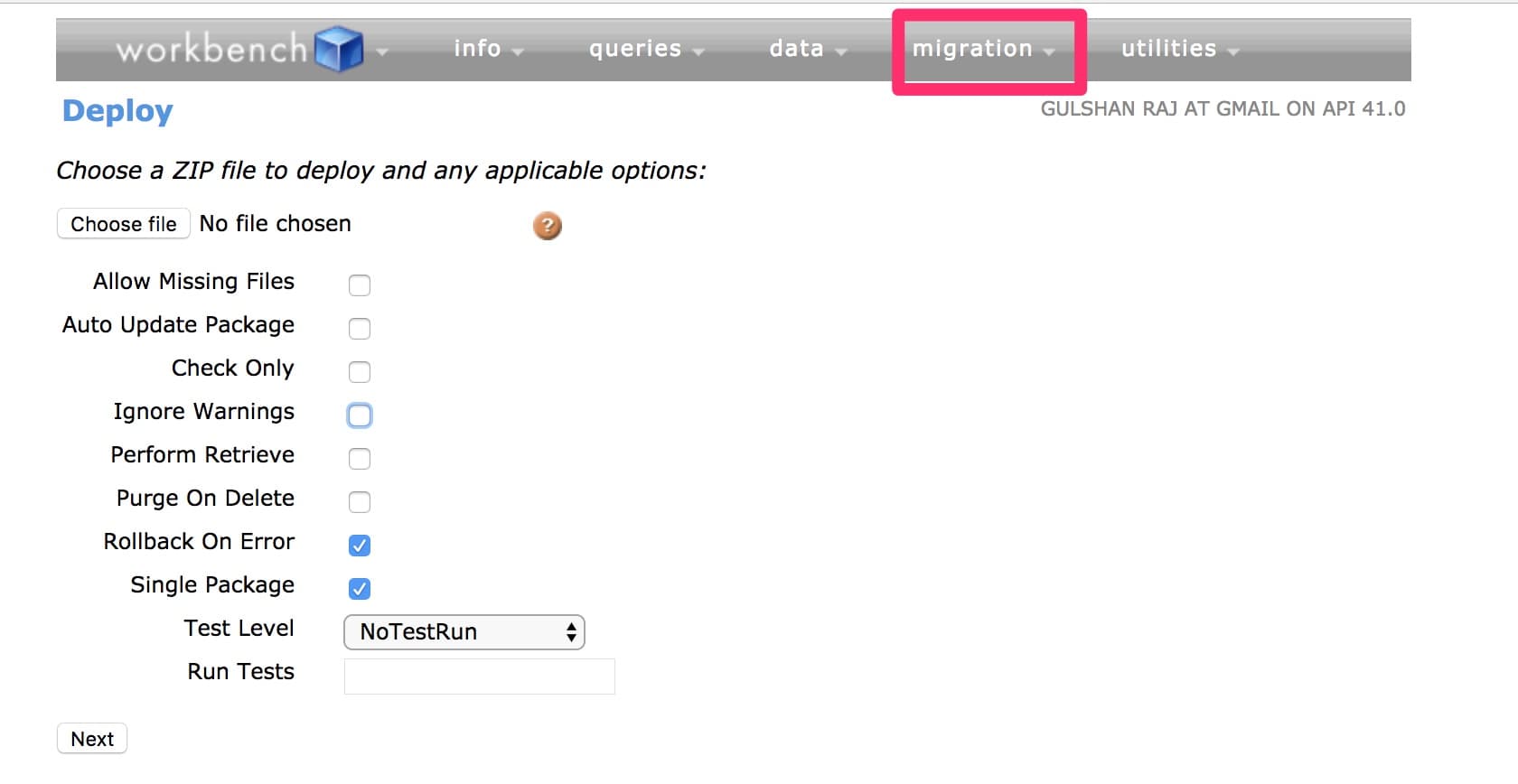
Step 1) Zip src folder.
Step 2) Login to the workbench.
Step 3) Go to migration -> Deploy
Step 4) Upload your zip folder by clicking "choose file".
Step 5) Check options as shown below and click next.
This is what your Rider History big object looks like after deployment:
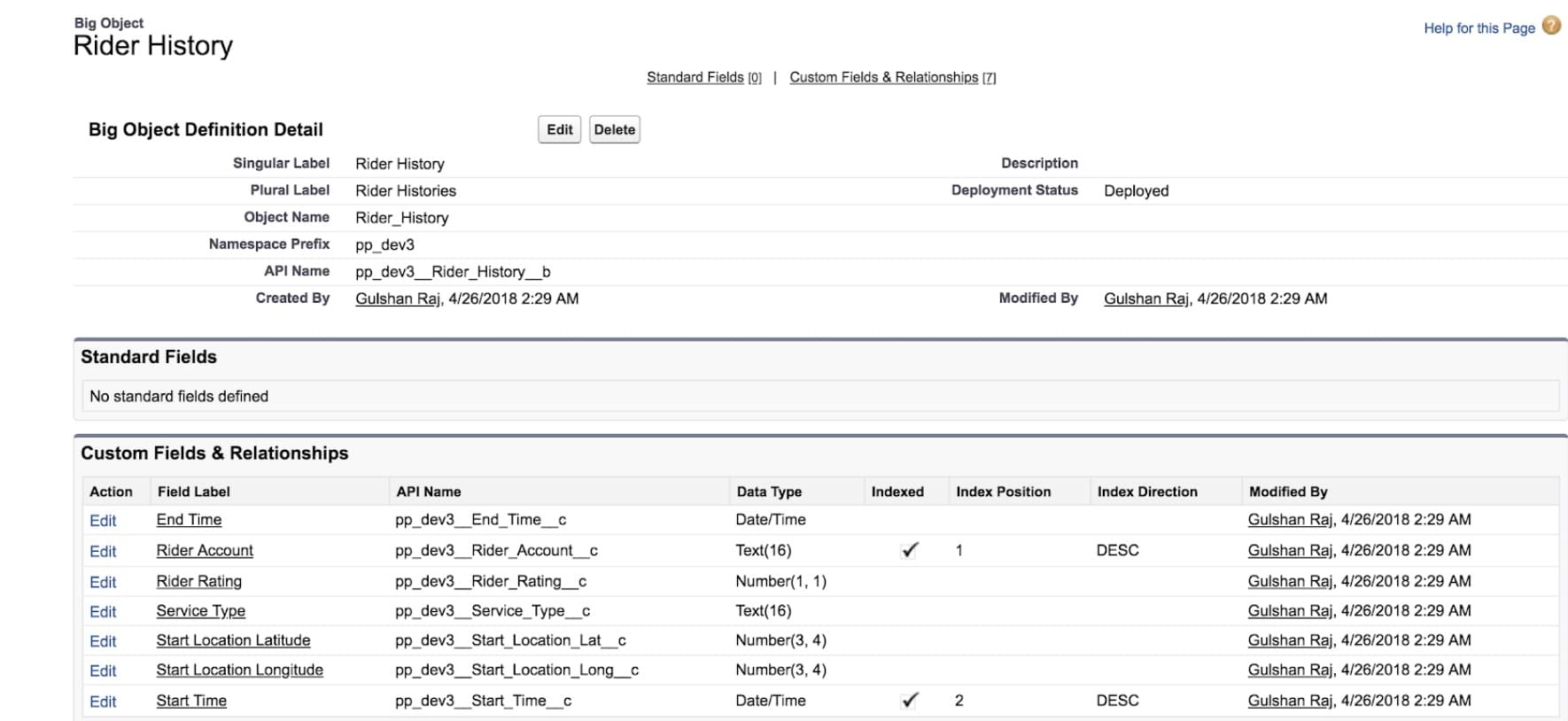
You can see your big object under the setup option "create -> big objects"
Apex CRUD operations to custom big objects
- Create
- public static List\<Database.SaveResult> insertImmediate(List\<SObject> sobjects)
- public static Database.SaveResult insertImmediate(SObject sobject)
- Read
- SOQL/ Async SOQL
- Update
- Re-inserting a record with the same index.
- Delete
- public static List\<Database.DeleteResult> deleteImmediate(List\<SObject> sobjects)
- public static Database.DeleteResult deleteImmediate(SObject sobject)
To query data, we have two options:
- Async SOQL
- SOQL
Use standard SOQL when:
- You want to display the results in the UI without having the user wait for results.
- You want results returned immediately for manipulation within a block of Apex code.
- You know that the query will return a small amount of data.
Use Async SOQL when:
- You are querying against millions of records.
- You want to ensure that your query completes.
- You do not need to do aggregate queries or filtering outside of the index.
References:
Happy coding!
Read also Effective data storage in Salesforce
Related Articles

Why You Should Sync Salesforce to an External Database
Quick Summary Why Your Salesforce Data Needs to Break Free Salesforce has…
January 8, 2026
19 Min Read
Fast Inline Editing Lists with LWC and Conga Grid
We had a client request to let users inline edit multiple records…
December 29, 2025
5 Min Read

Tips for Becoming a Salesforce Developer
Interested in becoming a Salesforce developer? In this blog post Jagmohan has put together his favorite tips and resources to get started in the world of Salesforce development.
April 4, 2024
6 Min Read

Partners

Company
Get in touch
Locations: New Hampshire, India, Maine, Colorado, Poland, Ukraine, Belarus
Email: help@cloudanswers.com
Phone: +1 508 500 8333