Say Goodbye to Salesforce Duplicates with CloudAnswers’ Potential Duplicates & Bulk Merge
December 16, 2025 · 17 min read
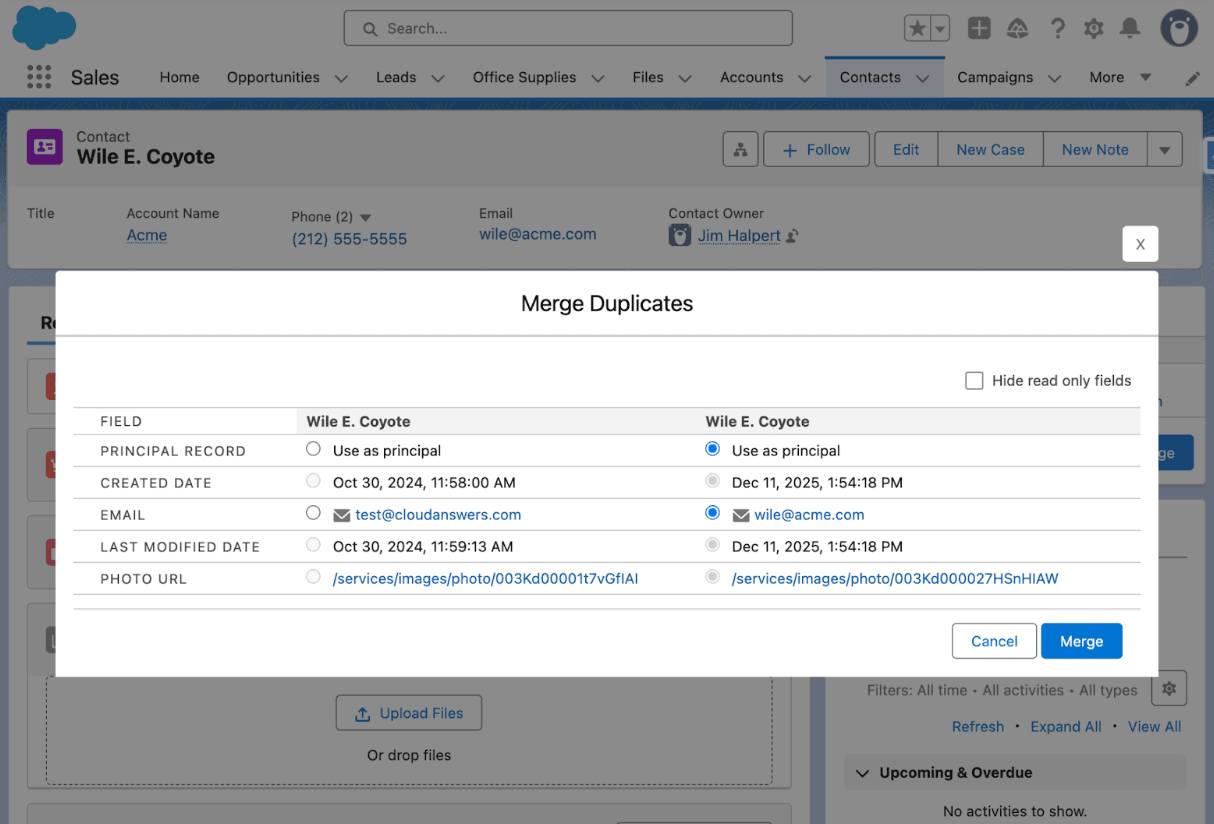
Duplicate data can feel like misaligned puzzle pieces – information that should fit together but ends up scattered and redundant. If you’ve ever pulled up a Salesforce contact and found two or three entries for the same person (each with a bit of different info), you know the headache it causes. Beyond the annoyance, duplicate records pose serious challenges for organizations.
In this post, we’ll explore why duplicate data is such a problem and how CloudAnswers’ Potential Duplicates Component & Bulk Merge app provides a powerful solution. This free app brings advanced deduplication tools right into your Salesforce org to keep your data clean. It’s already helping other companies keep their Salesforce data tidy, and it can do the same for you.
Why Duplicate Data Is a Major Problem
Think duplicate records are just a minor inconvenience? Think again. Duplicate data can silently wreak havoc across your business. In fact, data integrity issues like duplicates cost U.S. companies hundreds of billions of dollars every year. Gartner researchers found that poor data quality costs organizations an average of $12.9 million annually. Duplicates are a huge part of this problem – they’re widespread in most CRM systems and detrimental to customer relationships.
Why do duplicates hurt so much? Let’s break down some of the impacts of messy, duplicate-laden data in your Salesforce CRM:
Wasted Sales Time & Opportunities
Your sales reps might unwittingly call the same prospect twice or step on a colleague’s toes because two leads actually turn out to be the same person. This leads to confusion, redundant effort, and an unprofessional impression when a prospect realizes two reps from your team are contacting them about the same thing. Duplicates also inflate your sales pipeline with ghost data, making your forecasts unreliable.
Marketing Mistakes & Budget Waste
Ever received the same email or promotion from a company multiple times? Duplicated contacts in marketing lists can cause that exact blunder. It not only annoys your prospects but also makes your company look disorganized. Marketing teams may end up bombarding customers with duplicate emails or mailers, wasting campaign budget. Duplicates can lead to humiliating blunders that damage your brand’s image and squander your marketing budget.
Poor Customer Service
When a customer calls support, and your team has to sift through several nearly identical records to find the right info, service slows down. Agents might miss important context spread across duplicate accounts or contacts. This fragmented view means a less satisfying support experience for the customer. Duplicate records force reps to check multiple files for a full history, or risk proceeding with incomplete information – either way, the customer experience suffers.
Inaccurate Reporting & Analytics
Salesforce reports and dashboards are only as good as the data behind them. If 5 different records actually represent the same customer or deal, your analytics are skewed. You could think you have 500 customers when 50 of them are duplicates, or overestimate your pipeline because deals are counted twice. Decision-makers end up navigating with a broken compass when duplicate data lurks in the CRM.
Higher Costs & Compliance Risks
Many organizations don’t realize that duplicates can hit the wallet directly. More records than necessary means higher data storage usage – and since Salesforce pricing models are tied to the number of records, duplicate entries can drive up your costs needlessly. (Why pay to store the same customer data multiple times?) There’s also the risk of running afoul of data privacy rules if a customer asks to remove their data and you purge one record but miss its duplicate. In regulated industries, maintaining a single accurate record per customer isn’t just best practice – it’s often a compliance requirement.
Duplicate data isn’t just an irritating quirk in your Salesforce org – it’s a threat to efficiency, customer satisfaction, and the bottom line. They cause users to distrust the system and undermine confidence in your CRM. Now that we’ve seen how significant the issue can be, let’s look at how CloudAnswers tackles this problem head-on.
How CloudAnswers’ Potential Duplicates Component & Bulk Merge Solves the Issue
CloudAnswers has developed a solution to make duplicate management in Salesforce simple, efficient, and even user-friendly. The Potential Duplicates Component & Bulk Merge app is a 100% native Salesforce app that addresses duplicates from two angles:
- On-the-Spot Duplicate Handling – Potential Duplicates Component
- Mass Cleanup – Bulk Merge Tool
By combining these, the app covers both daily data entry and big-picture cleanup. Here’s how it works and what sets it apart from other solutions.
Potential Duplicates Component (In-Record Duplicate Management)
The Potential Duplicates component is a Lightning component that you can add to any record page that supports duplicate rules (currently Account, Contact, Lead, and custom objects). Once in place, it will display any potential duplicates for that record based on Salesforce Duplicate Rules you’ve defined. This means that as soon as a user views a record, they can immediately see if other similar records exist. Compared to the standard component for Leads, Accounts, and Contacts, this component lets you customize which fields are displayed, so users can see whether it’s a duplicate before even opening the review screen. And the Potential Duplicates component can be added to custom objects, where the standard component is unavailable.
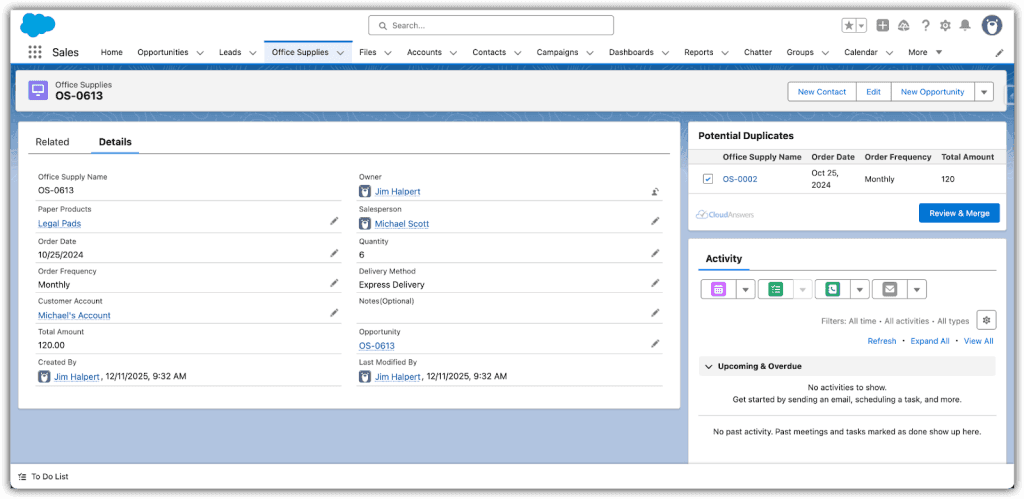
What’s really empowering is that users can merge duplicates right from the record page. The component guides you through selecting up to 3 duplicate records and choosing which field values to keep in the principal record. With just a few clicks, the duplicates are merged and cleaned up. This makes it super easy for everyday users, the ones who typically know the data best, to pitch in and maintain data hygiene as part of their everyday workflow. By surfacing possible dupes to your sales, marketing, and support folks in real time, the burden of cleanup no longer falls solely on periodic admin scrubbing – it becomes a collective effort.
Key features of the Potential Duplicates component:
Runs on More Object
Unlike Salesforce’s standard duplicate component (which is limited to Leads, Accounts, and Contacts), CloudAnswers’ component also works on custom objects, wherever you have a duplicate rule in place. This flexibility sets it apart – you can maintain a single view of the truth across all standard and custom data in Salesforce.
Uses Your Matching Rules
The component leverages Salesforce’s native Matching Rules and Duplicate Rules. You define what constitutes a “match” (exact email, fuzzy name, etc.) using Salesforce’s built-in rules, and the component uses those criteria to find dupes. This means it’s highly customizable to your business logic and doesn’t require uploading your data to an external system – everything stays in Salesforce (keeping your data secure and compliant). Since Salesforce’s duplicate rules can also be used to prevent duplicates or alert people when editing or creating records, all of your duplicate rules can be maintained in one place – controlling when duplicates are blocked, users are alerted, or just when it’s shown as a potential duplicate for the user to handle.
Quick Merges with User Control
A user seeing potential duplicates can initiate a merge and will be shown a side-by-side comparison to pick the principal record and which values to keep from each record. Only fields that differ are displayed for review, making it efficient to consolidate information.
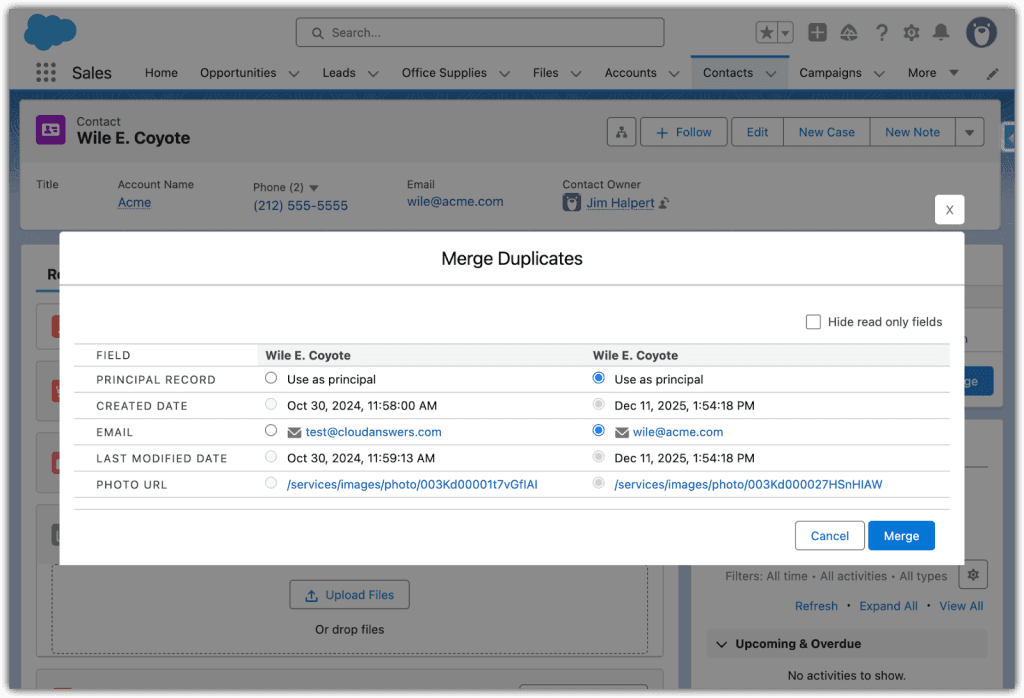
The app even allows merging related records, like activities or opportunities under the principal, so nothing important is lost (one reviewer noted surprise at “how well this works to solve a universal problem,” merging not just the records but also related data). By merging duplicates in just a few clicks, teams save time and ensure data stays accurate.
Improved Data Quality and Trust
By cleaning duplicates on the fly, you prevent the issues we discussed earlier. Reps and agents can trust that the record they’re looking at is the one and only record with that information. Reports become more accurate. Using this tool significantly improves user adoption because people trust the CRM data more. Clean data is reliable data.
Free and Proven
The Potential Duplicates component has been available for years as a free tool, and it’s tried-and-true. We developed this tool after several consulting clients requested an easy way to keep their data free of duplicates. We released it for free because we believed this should be a standard component in Salesforce.
By empowering end-users to merge obvious duplicates as they work, the component addresses the “looser matching rules” scenario – those potential duplicates that might not be caught by strict automation, but that a human can recognize and confirm. However, what about those big cleanup projects, or catching duplicates en masse across your entire database? That’s where Bulk Merge comes in.
Bulk Merge for Mass Deduplication
Bulk Merge is the game-changing feature introduced in Potential Duplicates V2. It gives Salesforce admins (or anyone responsible for data quality) a powerful interface for scanning the entire org for duplicates and merging them in bulk. Think of it as a de-dupe wizard that can clean up years of accumulated duplicates in a fraction of the time it used to take, and still for free.
The Bulk Merge tool can find duplicate records across your Salesforce org and let you merge or auto-merge them according to set rules. It supports all standard and custom objects that have duplicate rules in Salesforce.
Here’s How Bulk Merge Works and Why It’s a Big Deal:
Org-wide Duplicate Scan
Bulk Merge lets you pick an object (say, Contacts) and run a full scan of your Salesforce org for duplicates on that object. It uses the existing duplicate rules in your org to identify matches, so you’ll want to make sure you have appropriate matching rules in place (just like for the component).
Once you hit “Run Duplicates Search,” the app combs through all your records behind the scenes (this might take a bit if you have millions of records – a good time to refill your coffee!). After the scan, it will list out all the duplicate sets it found. This beats the manual process of running reports or spot-checking – Bulk Merge finds duplicates proactively.
Merge Hundreds at a Time
The “bulk” in Bulk Merge is no joke. Rather than merging duplicates one set at a time, you can select dozens or even hundreds of duplicate sets and merge them all in one go. CloudAnswers designed Bulk Merge to handle merging hundreds or thousands of records, dramatically reducing the time and clicks needed for cleanup.
What might have taken hours of tedious work through Salesforce’s standard merge (which only allows three records at a time) can now be done in minutes. For example, in testing, an admin was able to merge 30 duplicate records in about 5 minutes, and nothing is stopping you from processing hundreds of duplicates in a automerge – an hours-long chore turned into a quarter-hour task. This is a lifesaver when you’re doing an initial cleanup or routine maintenance on a large org.
Manual Review vs. Auto-Merge
Not all duplicates are created equal. Some you might want to eyeball before merging, others are obvious no-brainers. Bulk Merge supports both modes:
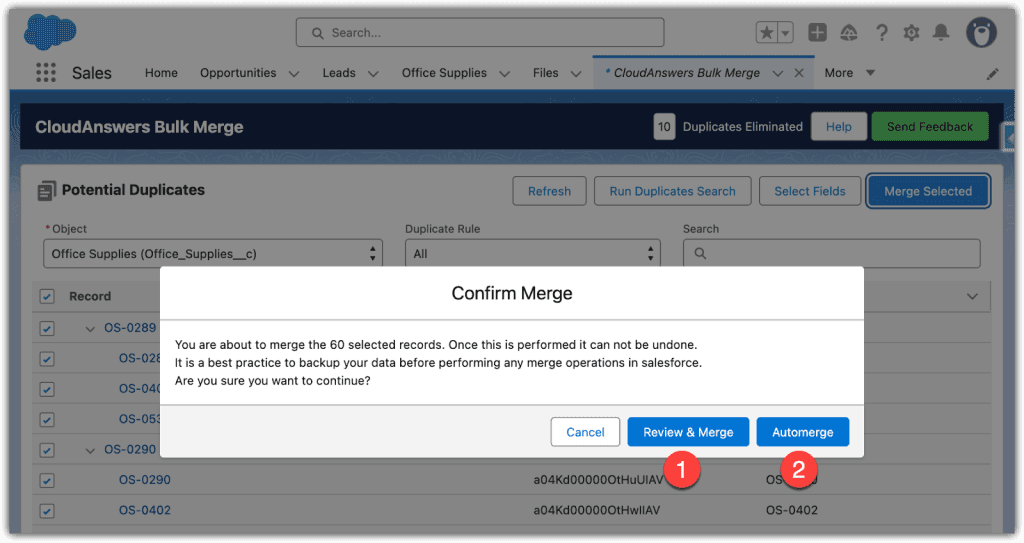
Manual Merge
You can step through each duplicate group, review the records, and decide field-by-field which information to keep (just like the in-record component, but on a larger scale). This is great for scenarios like recently imported leads from a tradeshow – you want to ensure new info (like an updated phone number) isn’t lost when merging with an older record. Manual mode keeps you in control for critical merges.
Automerge
For duplicates that meet clear criteria (for instance, entries that are exact matches on Email or some reliable ID), you can let the app auto-merge them. Bulk Merge allows you to choose a rule for the principal record (e.g., always keep the oldest record, or the newest, or the one last modified) and then automatically merge all selected duplicate sets following that rule.
This “fire-and-forget” option is perfect for cleaning up obvious dupes – say, a batch integration accidentally created duplicate accounts every night for a week; you can merge them all, keeping just the first occurrence of each. Auto-merge massively speeds up cleanup when you trust your matching rules.
Any Object, Any Time
Just like the component, Bulk Merge works with any object that Salesforce duplicate rules support. Standard objects (Accounts, Contacts, Leads, etc.) of course, but also custom objects – if you’ve set up duplicate rules for a custom object (maybe you have a custom “Student” object or “Donation” object for a nonprofit), Bulk Merge can find and fix dupes there too.
This broad support is something many third-party tools don’t offer without extra cost. And because Bulk Merge is native, it respects all your Salesforce permissions and security. If a user doesn’t have access to certain records, they won’t be able to merge them – ensuring data governance isn’t violated.
Time & Resource Savings:
The net effect of Bulk Merge is significant efficiency gains. CloudAnswers users have reported saving countless hours and resources thanks to this feature. Instead of dedicating entire afternoons or paying expensive consulting hours for deduplication projects, an admin can routinely clean the org in a few clicks. By keeping your database clean, you also save costs down the line (why pay for 100,000 records when 10,000 of them are duplicates you could remove?). And with better data, all your downstream processes (from marketing automation to analytics) run more smoothly.
The Potential Duplicates app addresses duplicate data continuously (via the in-record component) and in big batch fixes (via Bulk Merge). This one-two punch ensures both newly introduced duplicates and long-standing clutter are taken care of. Few other solutions offer this level of flexibility – especially at no cost and fully within the Salesforce platform. It’s like having an intelligent de-duplication assistant living inside your CRM.
Who Should Use This App?
The short answer: any Salesforce user or org that cares about data quality (which should be everyone!). But let’s get specific:
Salesforce Administrators
If you’re an admin, maintaining clean data is probably one of your responsibilities – and also one of your biggest headaches. This app is a godsend for you. It gives you superpowers to quickly tidy up large data sets and automate a lot of the dedupe process. No more manually exporting to Excel or purchasing expensive one-time data cleaning services.
As one Admin wrote in their review, “This app works amazingly and I am a big fan! It’s a must for all admins and developers… just install this!”. In other words, it saves admin time and effort, and even developers won’t need to write custom deduping code or Apex triggers – the heavy lifting is already handled.
Salesforce Consultants
Implementing Salesforce for clients? You know that data migration and deduplication is a huge part of any rollout. By using CloudAnswers’ Potential Duplicates app, you can deliver a cleaner database and equip your client with an ongoing solution to keep it clean. It’s an excellent value-add (did we mention it’s free?) that you can include in your toolkit. Consultants working with nonprofits or small businesses will especially appreciate having a no-cost dedupe option.
Organizations with Large Datasets
The more records in your system, the more duplicates likely hide within. If you manage a large Salesforce org (thousands or millions of contacts, leads, accounts, etc.), a manual approach to find and merge duplicates simply doesn’t scale. Bulk Merge was designed with scale in mind – merging hundreds of dupes at once. Enterprises and fast-growing companies can use it to keep data quality high even as the database grows. This also helps avoid performance issues and unnecessary storage costs from too much redundant data.
Nonprofits and NGOs
Nonprofit organizations often deal with large contact lists (donors, volunteers, event attendees) and frequently import data from external sources (event registrations, donation platforms), which can introduce duplicates. Clean constituent data is critical for meaningful engagement – you don’t want to ask the same donor for a donation twice because they accidentally ended up with two records.
Moreover, nonprofits usually operate on tight budgets, so purchasing a pricey data management tool might be off the table. CloudAnswers’ app being 100% free is a huge advantage here. It’s an ideal solution for nonprofits using Salesforce (including those on the Nonprofit Success Pack) to maintain a single, accurate record for every constituent.
Businesses that Rely on Clean CRM Data
This is basically all businesses, but if your success hinges on data (think marketing agencies, financial services, higher education, healthcare providers with patient data, etc.), you need a deduplication strategy. Mistakes from duplicates in these contexts can be costly and even carry legal risk. For instance, in healthcare CRM use, duplicate patient entries could lead to fragmented medical histories.
Or in sales, duplicate accounts might mean missing out on cross-sell opportunities because data was split up. Any organization that can’t afford to have confusing or incorrect customer data should consider this tool. It’s especially useful if you have multiple data sources feeding Salesforce (web forms, integrations, list uploads by different departments) – those environments are ripe for duplicates. Potential Duplicates will act as a safeguard, catching dupes as they come and giving you the means to eliminate them swiftly.
If you see yourself in any of the above, the Potential Duplicates Component & Bulk Merge app is built for you. It removes the drudgery of duplicate cleanup and lets you focus on what matters: using Salesforce to grow relationships and drive results, with confidence that your data is solid.
Why Free
If you’re still reading this post, you must be interested in cleaning up your duplicates, and like what you’re hearing about this app. And you may be wondering, why is this free? The short answer to that is that we do plan to make a paid edition in the future. But like our Report Sender app, we plan to keep some features free for anyone. We do that for a few reasons:
- We work with a lot of nonprofit organizations and small businesses that are very budget conscious. We believe these organizations should still be able to have clean data (and other admin tools, we have a few free apps).
- We believe to build great Salesforce apps, we need to see what works across not just dozens of organizations, but hundreds or thousands of organizations. Salesforce usage varies wildly across different industries, company sizes, and regions, so we want to gather as much feedback as we can to make our products are robust, error-free, and easy to use.
- We needed a tool for our consulting clients anyway, so we thought, why not release it to other people to use and see if it gets enough interest to become something bigger?
If you are interested in having our consulting team help with cleaning up your data, or want to learn about some of the advanced tools we’re building, just let us know. We’re happy to help.
Getting Started
Maintaining clean data in Salesforce is not just a one-time project – it’s an ongoing discipline, and it’s critical for any organization that wants to make the most of its CRM. Duplicate data, as we’ve seen, can undermine even the best sales and marketing efforts and cost a fortune in wasted time and resources.
The good news is that you can take control of your data. CloudAnswers’ Potential Duplicates Component & Bulk Merge app gives you a robust, user-friendly way to keep duplicates at bay and ensure your Salesforce instance is accurate and trustworthy.With the combination of real-time duplicate alerts on records and bulk merging capabilities, you’ll quickly wonder how you ever managed without these tools.
The fact that CloudAnswers offers this solution 100% free removes any barrier to trying it out – there’s literally nothing to lose except your duplicate data! If you’re not already using Potential Duplicates, now is the perfect time to install it and start reaping the benefits of cleaner data. We invite you to try the app for yourself and see the impact on your organization’s efficiency and data quality. You can find CloudAnswers Potential Duplicates Component & Bulk Merge on the Salesforce AppExchange and get it running in minutes. In a world where business moves fast, don’t let duplicate data trip you up. Give your team the gift of clean, reliable information. With CloudAnswers’ help, say goodbye to Salesforce duplicates for good and hello to a smarter CRM. Get started today and make “dirty data” a thing of the past!
Related Articles
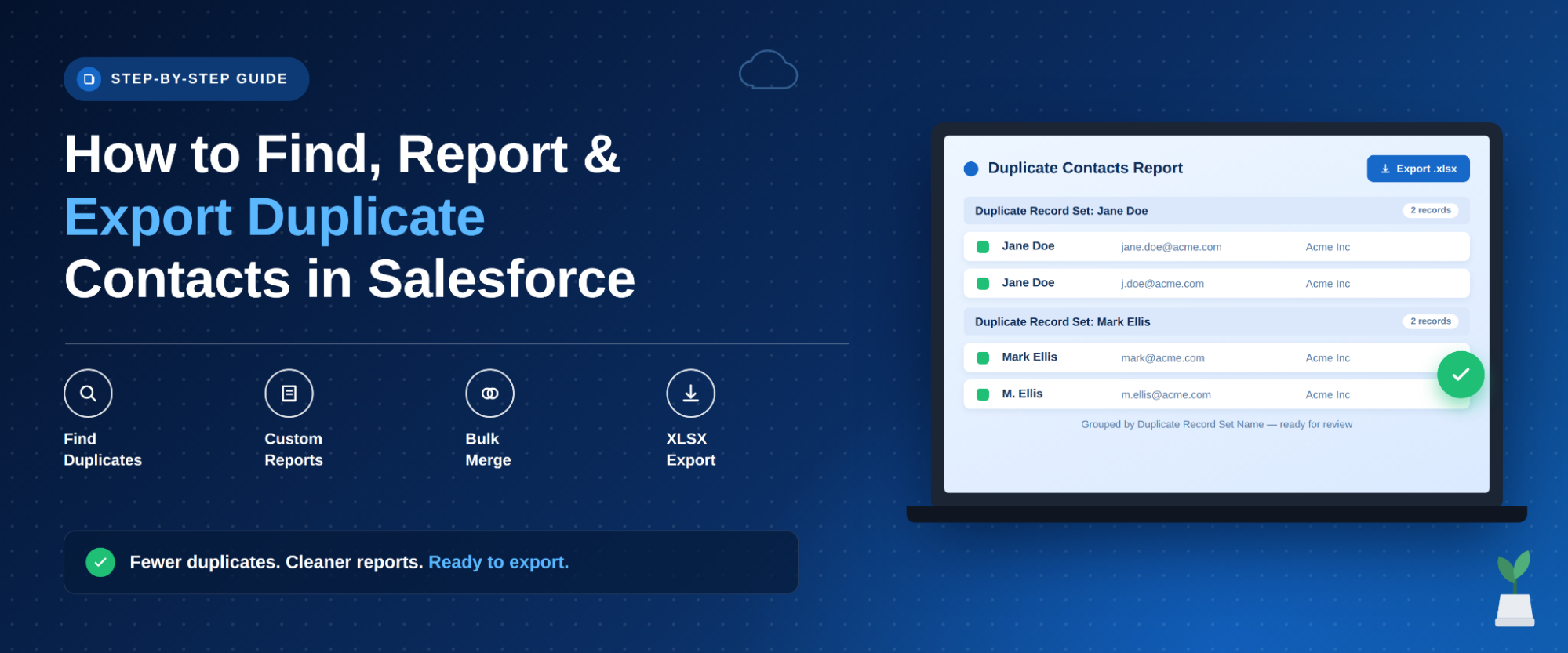
Identify, Report, and Export Duplicate Contacts in Salesforce
Duplicate Contacts are a common challenge in Salesforce. Over time, the same person may be added more than once, leading to inconsistent data, duplicate communication, wasted time, and inaccurate reporting.
September 30, 2026
5 Min Read

Partners

Company
Get in touch
Locations: New Hampshire, India, Maine, Colorado, Poland, Ukraine, Belarus
Email: help@cloudanswers.com
Phone: +1 508 500 8333