
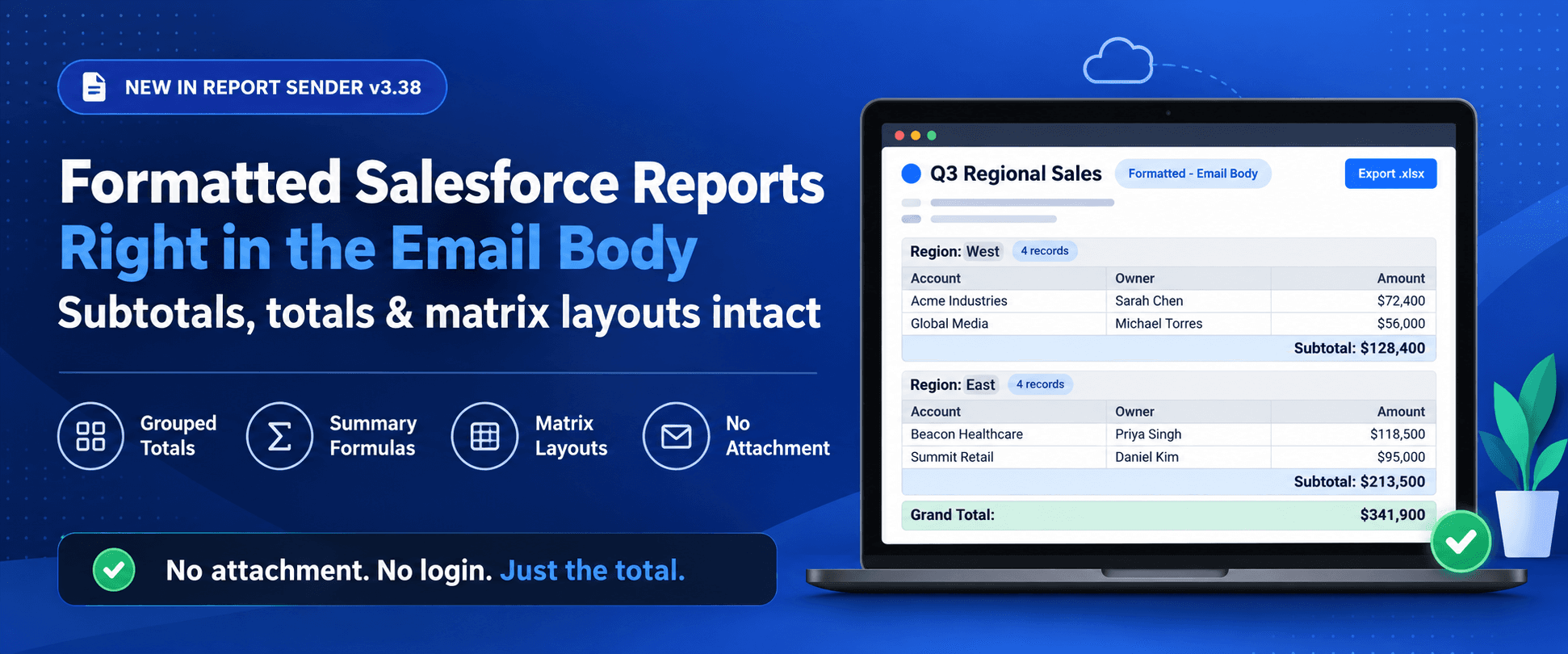
The Total Was Right There. Now It's in Your Inbox Too.
How to email a formatted Salesforce report, with summary formulas, subtotals and matrix layouts intact
Short answer: Report Sender v3.38 puts your Salesforce reports straight into the body of scheduled emails and keeps the formatting: groupings, subtotals, grand totals, matrix layouts and custom summary formulas. You now have a send format called Formatted - Email Body. Recipients see the report as it looks in Salesforce straight in the email body, with no attachment to open and no login.
It's available in Report Sender Plus and Premium.
The case of the missing total
You build a report in Salesforce, group it by region, add a summary formula that took three tries. At the bottom sits the number everyone actually wants... the total (or average, or something more complicated).
Then you schedule it, and the email arrives without it.
Previously, Report Sender put reports in the email body using the Details Only export: every row, neatly in a table, and none of the summaries. That's perfect for a list of open cases. It's much less useful when the whole point of the report is "how many, how much, and how often."
Most people used attachments, but we all know what happens to attachments on a Monday morning - they get opened "later", which usually means never.
Does one of these sound like your report?
The billing company that just wanted a total
A healthcare billing company sent each of its client facilities a regular report. One facility asked a fair question: could it show the total number of clients?
Easy, right? The team added a summary formula in Salesforce. It didn't make it into the email. They tried several other settings, and none of those worked either. Their Director of Operations summed it up perfectly:
"The Summary Formula column does not even show up in the sent report... If we could use the formatted excel option then the row counts and everything would come through."
That's exactly what we built. With Formatted - Email Body, the summary formula, the row counts and the grand total all show up in the email, right where they belong.
The manufacturer who wanted it to look like Salesforce
A demand planning manager at a precision manufacturer sent reports packed with ten currency fields. In the plain email table, it looked cluttered. Their wish was simple:
"...a way to have the Report Sender embedded table look more like the native SF embedded reports."
The new format starts from Salesforce's own formatted version of the report. So the email follows the layout the report owner designed.
The nonprofit with a matrix in mind
The IT director of a nonprofit media organization had happily used the free edition of Report Sender for years (like many of our users). Then they wanted something more: a matrix report, rows and columns of totals, in an email to colleagues. Before v3.38, a matrix only went out as an attachment.
When they heard formatted email reports were coming, they were our prime beta tester.
What makes it through now
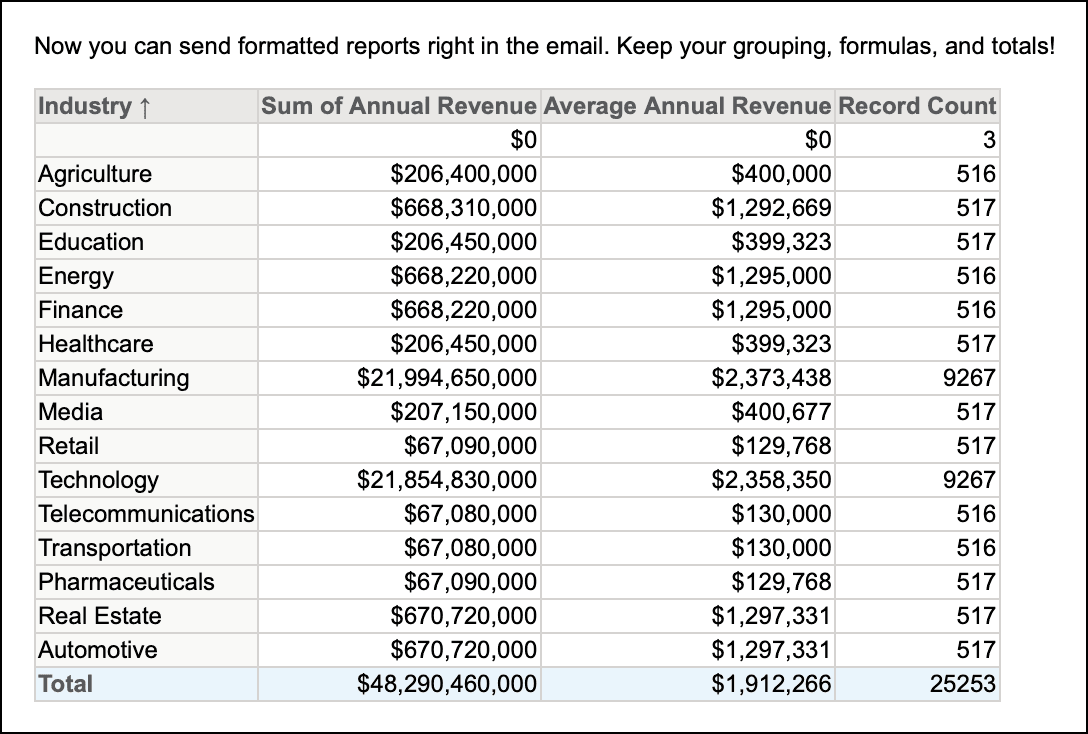
Everything that makes a summary report worth reading:
- Row and column groupings, including multi-level groupings
- Subtotals and grand totals
- Custom summary formulas
- Matrix report layouts
- The details too: checkboxes as TRUE/FALSE, line breaks in long text fields, and clickable hyperlink formula fields
It plays well with others
- Email templates: drop the report under your own Classic or Lightning template, with your message and branding on top.
- Filtered sends (Premium): send one schedule to many people, each getting a report filtered to their own records, with merge fields to personalize the subject and message.
- Dashboards and multiple reports: pair one email-body report with dashboards and other reports as attachments in the same schedule.
- Secure file sending: if a schedule uses it, the format switches to Details Only - Excel (.xls).
- Free edition: the report arrives as a CSV attachment instead.
Which format should you pick?
| If your report is... | Use |
|---|---|
| A list where every row matters (open cases, new leads) | Details Only - Email Body |
| A summary or matrix report where the totals are the point | Formatted - Email Body |
| Thousands of rows that people will filter and analyze | An XLS or CSV attachment |
If a formatted report is too big to make sense for an email body (currently over 5,000 rows), we attach it as a file for your convenience. See Report Sender Limits for the numbers.
Set it up in five clicks (give or take)
- Open the Report Sender tab in Salesforce and create or edit a schedule.
- Pick a summary or matrix report.
- Set File Format to Formatted - Email Body.
- Optionally, add an email template, recipients or a dynamic filter.
- Hit Preview, admire your totals, and save.
Formatted - Email Body shipped in Report Sender v3.38. It reached sandboxes on September 22, 2026 and production orgs on September 29, 2026.
FAQ
Can Salesforce email a report with summary formulas in the body of the email? Salesforce's native report subscriptions have limited formatting options. Report Sender's Formatted - Email Body format sends the report in the email body with custom summary formulas, subtotals and groupings intact.
Can I email a matrix report from Salesforce without an attachment? Yes. Choose Formatted - Email Body on a Report Sender schedule, and the matrix layout and its totals appear in the email body.
What's the difference between Details Only - Email Body and Formatted - Email Body? Details Only sends the report's rows as a plain table. Formatted sends the report as it looks in Salesforce, including groupings, subtotals and summary formulas.
Which Report Sender editions include Formatted - Email Body? Plus and Premium. Free orgs receive the report as a CSV attachment instead.
Can each recipient get a different version of the formatted report? Yes, with Report Sender Premium's dynamically filtered schedules. Each recipient gets a report filtered to their own records, and merge fields can personalize the email.
Does report data leave Salesforce to be formatted? The conversion happens on Report Sender's own backend service, the same one that delivers dashboards. No third-party conversion service is used.
Your totals miss you
Give your summary reports the inbox appearance they deserve. Install Report Sender from the AppExchange, or switch editions in a sandbox and try Formatted - Email Body on your own reports. Compare editions.
Related Articles
10 Salesforce Permissions You Should Almost Never Assign to Users
If you have ever inherited a Salesforce org and opened up the…
June 30, 2026
17 Min Read
7 Popular Reporting Apps for Salesforce
The profit of your entire Salesforce investment depends a lot on the…
May 18, 2026
9 Min Read
How to Build a Salesforce Backup Strategy: What to Back Up, How Often, and Where to Store It
If you’ve ever read a blog post about Salesforce backup that left…
April 30, 2026
16 Min Read

Partners

Company
Get in touch
Locations: New Hampshire, India, Maine, Colorado, Poland, Ukraine, Belarus
Email: help@cloudanswers.com
Phone: +1 508 500 8333